![Seelen UI Logo]() Seelen UI
Seelen UI
Fully Customizable Desktop Environment for Windows
Available in 70+ Languages






|

|

|
Overview
Seelen UI is a tool designed to enhance your Windows desktop experience with a focus
on customization and productivity. It integrates smoothly into your system, providing a range of features that allow you
to personalize your desktop and optimize your workflow.
-
Be Creative: Seelen UI lets you tailor your desktop to fit your style and needs. You can adjust menus, widgets,
icons, and other elements to create a personalized and visually appealing desktop environment.
-
Enhance Your Productivity: Seelen UI helps you organize your desktop efficiently. With a Tiling Windows Manager,
windows automatically arrange themselves to support multitasking, making your work more streamlined.
-
Enjoy your music: With an integrated media module that’s compatible with most music players, Seelen UI allows you
to enjoy your music seamlessly. You can pause, resume, and skip tracks at any time without the need to open additional
windows.
-
Be faster!: With an app launcher inspired by Rofi, Seelen UI provides a simple and intuitive way to quickly access
your applications and execute commands.
-
User-Friendly Configuration: Seelen UI offers an intuitive interface for easy customization. Adjust settings such
as themes, taskbar layouts, icons, etc. With just a few clicks.
Installation
[!CAUTION]
Seelen UI requires the WebView runtime to be installed. On Windows 11, it comes pre-installed with the system.
However, on Windows 10, the WebView runtime is included with thesetup.exeinstaller. Additionally, Microsoft Edge
is necessary to function correctly. Some users may have modified their system and removed Edge, so please ensure both
Edge and the WebView runtime are installed on your system.
[!NOTE]
On fresh installations of Windows, the app might show a white or dark screen. You only need to update your Windows
through Windows Update and restart your PC.
You can choose from different installation options based on your preference:
Microsoft Store (recommended)
Download the latest version from the Store page.
This is the recommended option because you will receive updates and a secure version of the program.
Note: It may take around 1 to 3 business days for changes to be reflected in the Microsoft Store, as updates are
approved by real people in the store.
Winget
Install the latest version using:
1 winget install --id Seelen.SeelenUI
This option also uses the signed .msix package and ensures you have the latest secure version. Similar to the
Microsoft Store, it may take around 1 to 3 business days for changes to be reflected in Winget, as updates are approved
by real people in the winget-pkg project.
.msix Installer
Download the .msix installer from the Releases page. This package is
signed, ensuring a secure installation. This is the same option as the Microsoft Store but is a portable installer.
.exe Installer
Download the latest version from the Releases page and run the
setup.exe installer. This option is less recommended as the installer is not signed, which may cause it to be flagged
as a potential threat by some antivirus programs. The setup.exe is updated more quickly than the Microsoft Store or
Winget versions and also it receives notifications updates on new release.
Usage
Once installed or extracted, simply open the program. The easy-to-use and intuitive GUI will guide you through the
configuration process. Customize your desktop environment effortlessly.
Documentation
For in-depth details on various aspects of Seelen UI, explore the following documents:
- Languages - Information regarding translations.
- Toolbar - Details about customizing and using the toolbar.
- Themes - Guidance on creating and applying themes.
- Window Manager - Instructions on configuring the window manager.
- Project - General information about the project and its structure.
Upcoming Features
I’m excited to share some upcoming features for Seelen UI! Here’s a glimpse of what’s planned for the future:
App Launcher ✅
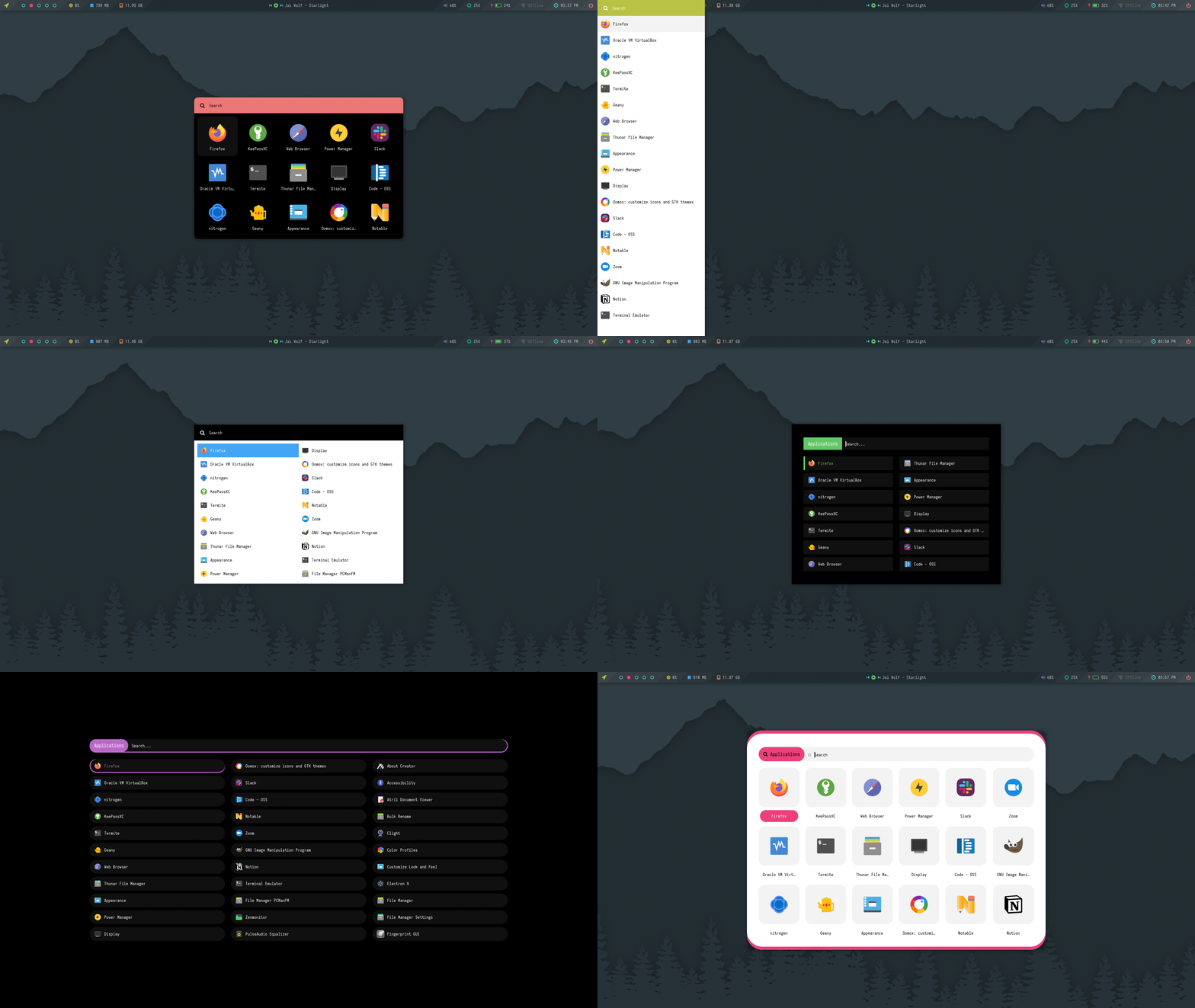
I’m planning to develop an app launcher inspired by Rofi on Linux. This feature
will provide a sleek and highly customizable way to quickly access your applications.
 Image
Image
courtesy of rofi-themes
Customizable Popup Widgets
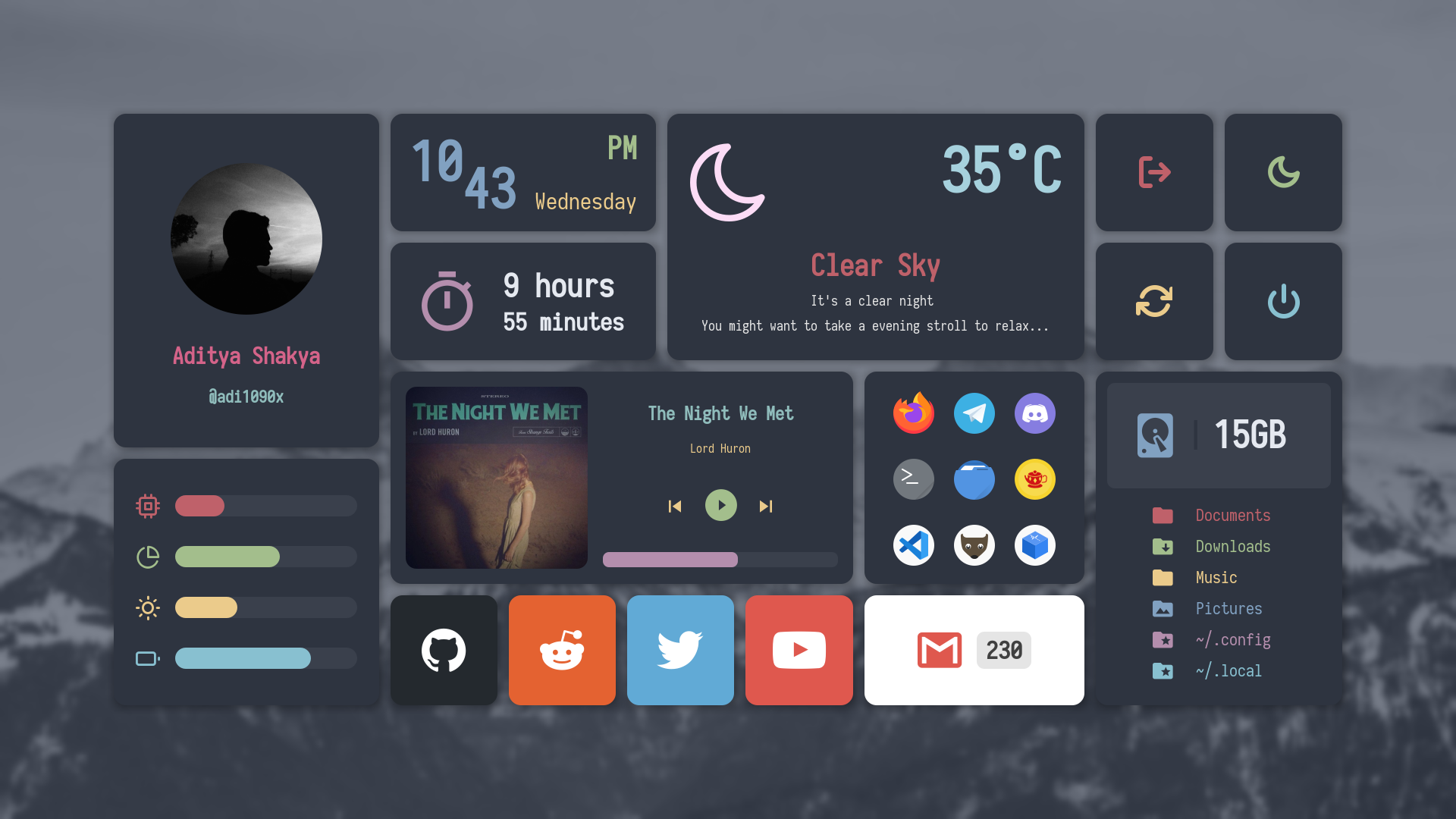
I aim to introduce a set of fully customizable popup widgets, similar to the features available in
EWW. These widgets will be highly configurable and adaptable to your needs, providing
an enhanced and interactive way to manage your desktop environment.
 Image
Image
courtesy of adi1090x
Custom Alt + Tab (Task Switching)
An upgraded Alt + Tab system for task switching is on the horizon. This will offer a more visually appealing and
functional experience, allowing for smoother transitions between open applications and windows.
Custom Virtual Desktops Viewer and Animations
I’m also working on a custom virtual desktops viewer and dynamic animations to improve navigation between different
workspaces. This will provide a more intuitive and immersive multitasking experience.
Stay tuned for more updates as I develop these features. I appreciate your support and enthusiasm!
Happy customizing!
The Seelen UI Team
Contributing
We welcome contributions!
- Read the Contribution Guidelines to get started with terms.
- Read the Project Documentation to understand the project structure and how to use it.
License
See the LICENSE file for details.
Contact
For inquiries and support, please contact me on Discord.
See you later
1234567891011121314151617181920212223242526 . .& _,x&"`` & . &' ;.&&' &. . &.& .0&&&;&""` . '& &.&&& .&&&&&' .& ;&&& &&&&&' && &&&&&&&& &&& 0& . &&&&&&&&"" && .0 &&&&&&& 0&& .&' &&&&&&:&&&&& . &&&&& 0&&&& & &&&&&&&&&' &&&&&&& .&&&x&&&&& :&&&&&0.&' , .&&&&&&&&&&;.&&&&. &&&&&&&& .&&&&&&&&&&' .0&&&& &&&&&&& ,&&&&&&&&&&&& &:&&&&; &&&&&0 ,;&&&&&&&&&&& ; .0 0&&&&&&&&&&0 ,;&&&&&&&&&&&&& & &; 0&&&&&&&&&&0 :',;".&&&&&&".& && &0 0&&&&&&&&&0 ',;',&&&&&" ,&' &&&&0 0&&&&&&&&&0 ,x&&&&" .&&& &&&&0 0&&&&&& .&&&&"'''"&&"&& &&&&&0 0&& .&&;`` `&: :& &&&&&&0 &"' &&&&&&&& &"& &"& &&&&&&&&0 0&&&&&&&&&&&&&&&&&&&&&&&&&0 0&&&&&&&&&&&&&&&&&&&0 Seelen 0&&&&&&&&&0
📌 Official Website: https://seelen.io
Seelen Inc © 2025 - All rights reserved
免责声明 © 2026 - 虚宝阁
本站部分源码来源于网络,版权归属原开发者,用户仅获得使用权。依据《计算机软件保护条例》第十六条,禁止:
- 逆向工程破解技术保护措施
- 未经许可的分发行为
- 去除源码中的原始版权标识
※ 本站源码仅用于学习和研究,禁止用于商业用途。如有侵权, 请及时联系我们进行处理。